Tip: How to Delete a Program or Rank with Students Attached
You’ve stopped running the Yoga program, but Kicksite won’t delete it: “You are unable to delete this program until all students are unattached.”
That’s deliberate. Deleting a program with students attached would leave those students holding ranks in something that no longer exists, and their promotion history would stop making sense.
First: should you delete it?
If students have ever trained in it, deleting is not the best practice. Deleting a program deletes the rank history that goes with it. A student who spent three years earning belts in a program you’ve retired loses that record.
Better options:
- Leave it. A retired program at the bottom of the list costs nothing.
- Rename it. “Yoga (retired)” keeps history intact and signals not to use it.
- Merge into another program. Move students across and keep the school tidy without losing anyone’s record.
Delete it if it was created by mistake, or was never really used.
Finding who’s attached
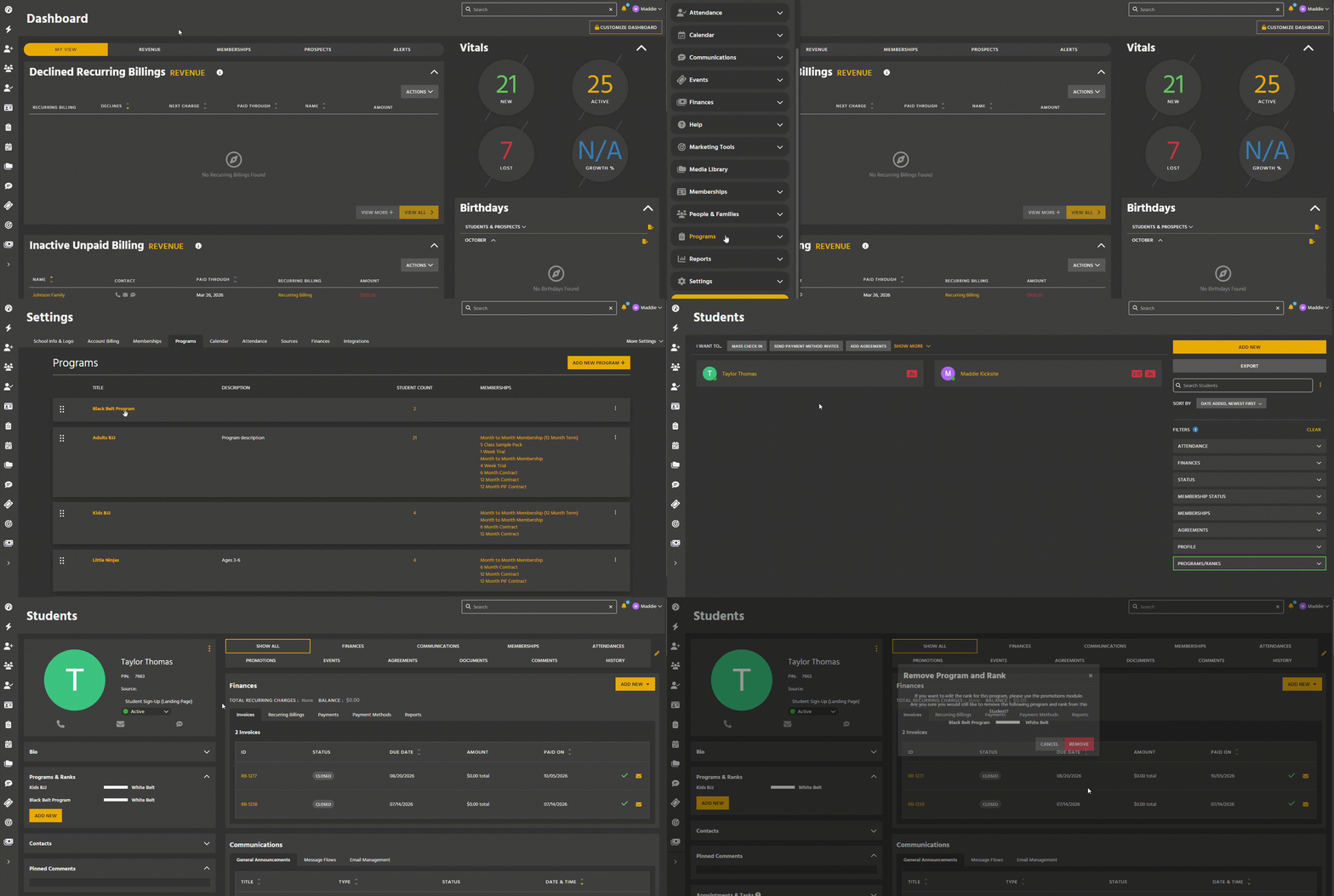
- Click Quick Links → Settings → Program & Rank Settings.
- For a program — click the student count to open the Student List filtered to it.
- For a single rank — click the program name, find the rank, and click its student count.
Filtered list in hand, set the Status filter to include Inactive and Frozen. Those students count too, and they’re the reason a delete usually still fails after you think you’re done.
Removing the program from students
For each student:
- Open their profile.
- Find Programs & Ranks in the Bio section on the left.
- Click the red X beside the program you’re removing.
Opening each student in a new browser tab — Ctrl+click on Windows, Cmd+click on Mac — means you don’t lose the filtered list each time.
If you’re merging rather than retiring
Add the new program before removing the old one, so the student is never left without one:
- On the Student Profile under Programs & Ranks, add the replacement program and pick the equivalent rank.
- Then remove the old program.
Give some thought to which rank they land on. A green belt in the old program may not automatically be a green belt in the new one.
Deleting the program
Once nobody is attached:
- Quick Links → Settings → Program & Rank Settings.
- Kebab on the program’s card, or on its settings page, then Delete.
- Confirm.
Deleting a single rank
- Open the program.
- Kebab on the rank’s row, then Delete.
- Confirm.
Same rule: no students can hold it.
Troubleshooting
Delete still isn’t available. Someone still has it. Check inactive and frozen students — that’s nearly always it.
A punch-card membership broke. Attendance-based membership templates need at least one program attached. Point them at a different program before deleting this one.
I deleted a program and lost promotion history. It’s gone. This is the argument for renaming instead.
A student now has no program. Add them to one so they can continue checking in.
Limitations
Ranks can’t be deleted while any student holds them.
No bulk action for removing a program from students.
Deleting a program deletes the rank history tied to it.